Check the content of a barcode
Go beyond the structure and check the content: is the expiry date far enough out? Is the GTIN the one you expect?
A code structure first checks whether the right fields are in the barcode. Often that is not enough: the best-before date is there, but it is two days away. The article number is present, but belongs to a different product.
That is what the content check is for. It lets you define which value is expected in individual fields — and barValid reports it right at the scan when the value does not fit.
What you need
- A code structure you have created (how to create one)
- Knowing which value you expect — e.g. “the expiry date must be at least 30 days out”
Step by step
-
Open the structure
Menu → Structure editor → tap the structure you want to extend. -
Tap the AI rule you care about
Under AI rules, tap the field whose content should be validated — for example 17 for the best-before date. -
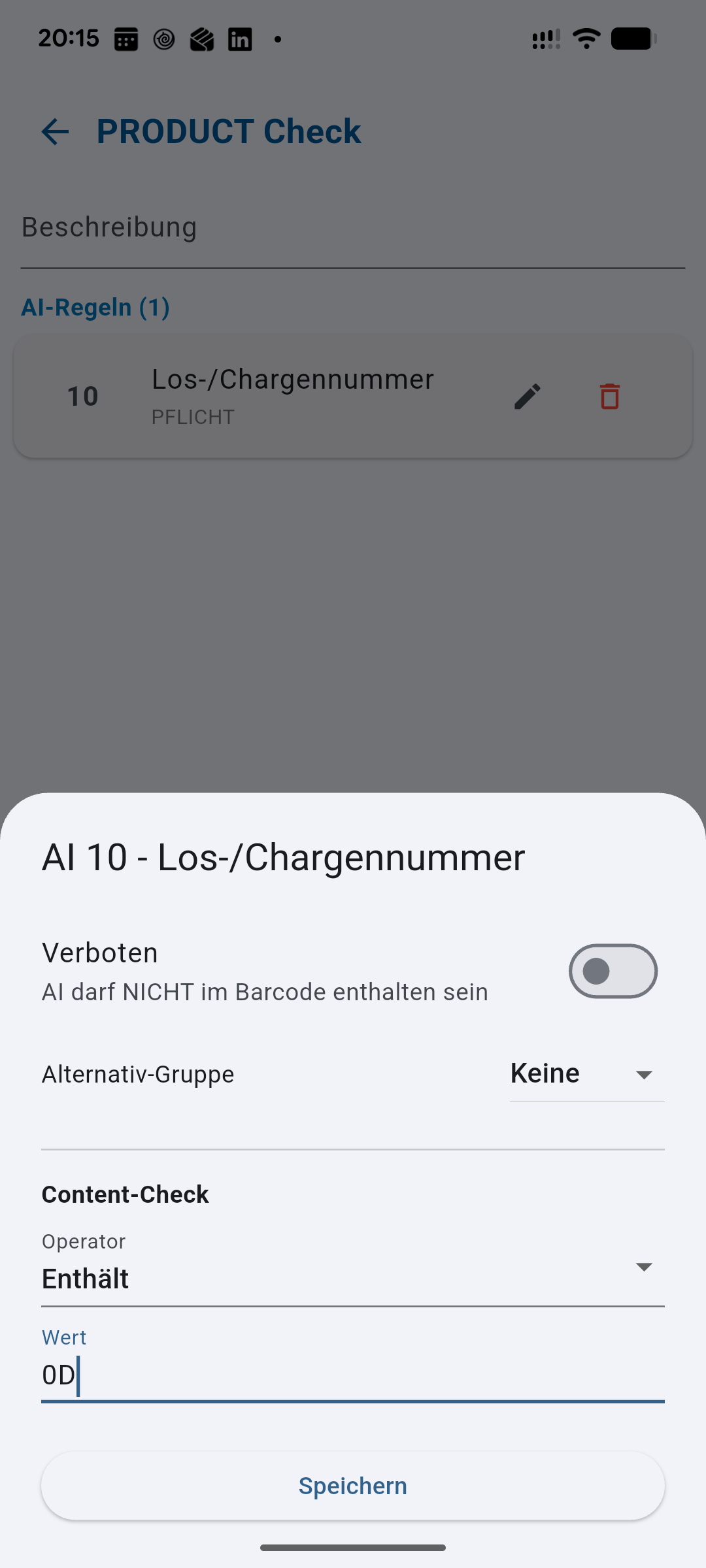
Scroll to “Content check”
Below “Forbidden” and “Alternative group” you find the Content check section. As long as it says No check, barValid only verifies whether the field is present — not what is in it. -
Choose the operator
The operator decides how the comparison works:- Equal (=) — the content must match the value exactly. For fixed article numbers.
- Contains — the content must contain the value. Handy for batches that always start with the same prefix.
- Greater (>) and Less (<) — for numbers such as quantities or weights.
- Older than (future) and the other date operators — for date fields such as expiry or production date.
-
Enter the value
Type what to compare against into Value. The date operators add a unit below — minutes, hours, days, weeks, months or years.Expiry example: operator Older than (future), value 30, unit days means the date in the barcode must be more than 30 days in the future. Goods that expire sooner stand out on the spot.
-
Save and scan
Tap Save, select the structure on the scanner and scan. If the content does not match, barValid flags exactly that field — the rest of the code stays readable, so you can see straight away which value is the problem.The result, field by field
Done — that’s all there is to it.
Typical checks at a glance
- Always the same article number (AI 01): operator “Equal (=)”, value = your GTIN.
- Batch with a fixed prefix (AI 10): operator “Contains”, value = the prefix, e.g. “DE-”.
- Remaining shelf life at goods-in (AI 17): operator “Older than (future)”, value 30, unit days.
- Maximum quantity per container (AI 30): operator “Less (<)”, value = your upper limit.
You will be quickest if you create one structure per use case — one for goods-in, one for final inspection — and pick the matching one at the top of the scanner.